The problem this solves
Enquiries, quotes, bookings, delivery and invoices live in separate places. Bring each job, its costs and its next action into one working business manager.
Product proof
See the actual Business OS working.
This is a real walkthrough of the downloadable app — not a stock dashboard. See the operational views, pipeline and planning screens before you buy.
- Real interface footage
- Fictional sample business clearly labelled
- No account or monthly subscription required
App-stack consolidation
Replace several basic business tools with one connected workflow.
ProofSpring is strongest when a small service business is using separate lightweight tools for each stage of the same job. The goal is consolidation, not pretending to match every advanced feature of every specialist platform.
| Separate tool / workflow | What Business OS covers | Keep the specialist tool when… |
|---|---|---|
| Basic CRM e.g. basic HubSpot / Pipedrive use | Client database, opportunity pipeline, values, stages and next actions. | You need marketing automation, email sequencing, lead scoring or deep integrations. |
| Project board e.g. basic Trello / Asana use | Projects, ownership, progress, due dates, risk, scope and logged hours. | You need complex dependencies, enterprise permissions or large-team collaboration. |
| Time tracker | Start/stop timer, manual entries, billable rates and unbilled job hours. | You need workforce attendance, approvals, GPS or payroll-connected timesheets. |
| Quote + invoice app | GST-ready quotes and invoices, PDFs, quote-to-invoice, statuses and payment tracking. | You need full bookkeeping, reconciliation, BAS, payroll or bank feeds — keep Xero/accounting software. |
| Basic roster / roster sheet | Weekly shifts, breaks, staff hours, estimated wage cost and copy-last-week. | You need award interpretation, STP, leave, payroll or workforce compliance. |
| Operational spreadsheets | Contacts, pipeline, expenses, cash planning, KPIs and review history in one workspace. | You need advanced modelling or bespoke spreadsheet analysis. |
Examples describe overlapping basic workflows only and are not claims of full feature parity. Product names and trademarks belong to their respective owners. ProofSpring is not affiliated with or endorsed by those companies.
Open the full stack comparison →60-second stack audit
How many separate tools are you using for work ProofSpring already covers?
Select the functions you currently manage in a separate app or spreadsheet. This does not assume feature-for-feature replacement; it shows where consolidation may be practical.
Select what you use today to see the consolidation opportunity.
Use your own numbers
Compare A$249 once with what your current operational apps cost you.
Enter the combined monthly spend for only the tools you believe ProofSpring could genuinely replace. Leave Xero/accounting software out of the number.
Illustrative comparison only. It uses the number you enter and does not assume equal features, switching costs or that every current tool should be removed.
What the system makes you do
- 01
Record the client and enquiry, then prepare a quote.
- 02
Book the job, assign staff and track delivery, time and expenses.
- 03
Convert the quote or unbilled hours into an invoice and record payment.
- 04
Review capacity, planned cash and weekly decisions; export and back up your data.
What you end up with
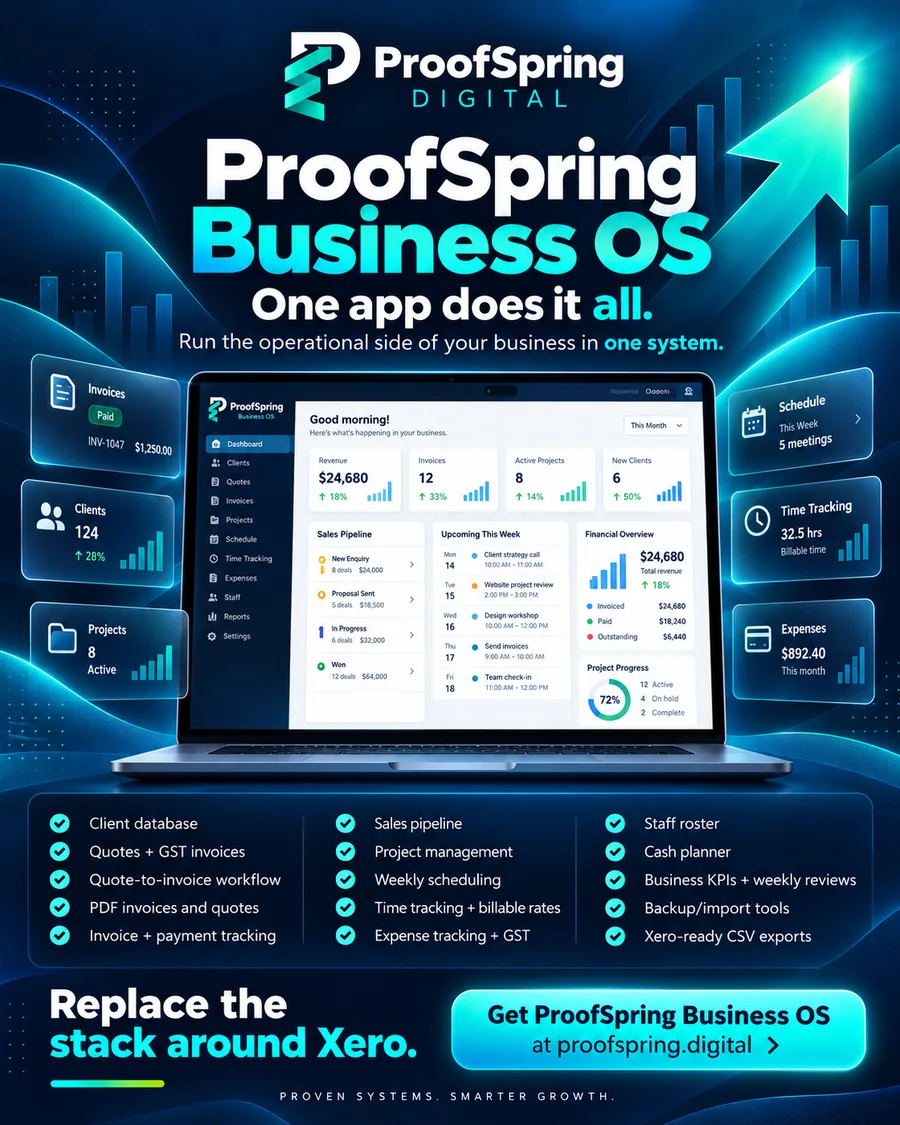
Take each job from enquiry to quote, booking, delivery, invoice and payment, with your team, costs, cash and weekly decisions connected in one place.
Clear boundary: operations vs accounting
Keep accounting where it belongs.
Run inside ProofSpring
- Clients and job history
- Quotes and GST-ready invoices
- Sales pipeline and projects
- Weekly scheduling and time tracking
- Expenses and job recharging
- Staff roster and estimated wage costs
- Cash planning, KPIs and weekly reviews
Keep in Xero / specialist software
- Bookkeeping and reconciliation
- BAS and tax lodgement
- Payroll and Single Touch Payroll
- Bank feeds
- Award-rate calculations
- Card payment processing
- Accountant/compliance workflows
The connection is file-based, not live: export Xero-ready CSV files for sales invoices, bills and contacts, then follow the included import guide.
Read the Business OS + Xero workflow →What is in the download
- Client database with contacts, addresses, ABNs, jobs, unpaid balances and invoiced-to-date
- Quotes and GST-ready tax invoices with line items, automatic numbering and one-tap quote-to-invoice
- PDF download for every quote and invoice, generated offline on the device
- Invoice tracking: draft, sent, paid, overdue and void, with payments flowing into the cash planner
- Time tracking against jobs: start/stop timer, manual entries, billable rates and one-click invoicing of unbilled hours
- Weekly job schedule and calendar with bookings, assigned staff, and job and invoice due dates
- Expense logging with GST, categories, receipt photos and job recharging
- Staff roster with shifts, breaks, weekly hours, estimated wage cost and copy-last-week
- Xero-ready CSV exports for sales invoices, bills and contacts, with duplicate protection
- Weighted sales pipeline with stage, confidence and next-action tracking
- Project delivery board with ownership, scope, progress, due dates, risk and hours logged
- Planned cash inflow/outflow view with live totals
- Weekly capacity, lead targets and operating pulse
- Structured weekly decision review and review history
- JSON backup/import plus CSV exports of every list
- Responsive offline interface for phone, tablet and desktop, with no account or subscription required
- 60-minute quick start and 30-day implementation playbook
- SOP structure and five practical SOPs
- Role and decision guide, operating cadence and KPI dictionary
- Privacy, backup and recovery guide
- Quotes, invoices, time and roster guide
- Step-by-step guide to sending your data to Xero
- Clearly labelled fictional sample business workspace
Trust by design
Transparent enough to decide before checkout.
Is this the right fit?
Built for
Trades, agencies, consultancies, studios, freelancers and other service businesses of 1–15 people, managed in a single browser.
Not for you if
You need hosted multi-user collaboration, payroll, BAS lodgement, award-rate calculations, bank feeds or card payment processing.
Need help choosing?
Three questions and the bottleneck finder will point at whichever of the 14 systems matches where your business actually is. If a different one fits better, it will say so.
Product questions
What do I receive?
An offline HTML/CSS/JavaScript business management app, Markdown implementation guides and JSON sample data. Open the included app in a current browser on phone, tablet or desktop.
Can my team work in it at the same time?
This is a single-browser business management system, not hosted multi-user software. You can manage jobs and rosters for a business of 1–15 people, but it is not a shared live workspace across staff devices.
Does it replace my accounting or payroll software?
No. It does not lodge BAS, run payroll or Single Touch Payroll, calculate award rates, connect to bank feeds or process card payments. Keep your accounting software for compliance. Roster wage costs are estimates.
How does Xero work with it?
Export Xero-ready CSV files for sales invoices, bills and contacts, with duplicate protection. Follow the included import guide. This is a file export/import workflow, not a live Xero connection.
Who is responsible for backups?
You are responsible for backups. Use JSON backup/import and follow the included privacy, backup and recovery guide.
What does the licence cover?
A$249 one-time for a one-business commercial-use licence. No subscription. See the Gumroad listing for the full licence terms.
How do I get started?
Follow the 60-minute quick start using the clearly labelled fictional sample workspace, then use the 30-day playbook to implement the system in your business.
What if it is not right for my business?
Email hello@proofspring.digital and tell me what went wrong. Checkout runs through Gumroad and its refund terms are shown at the point of purchase, but the sale is mine, so raise it with me. Nothing here removes the consumer guarantees you have under Australian Consumer Law.
Can it replace Trello or Asana?
For straightforward service-job tracking, often yes: Business OS covers projects, owners, progress, due dates, risk, scope and hours. It is not designed to match advanced collaboration, dependencies or enterprise project-management features.
Can it replace HubSpot or Pipedrive?
It can replace basic CRM and pipeline use when you mainly need client records, opportunity stages, values and next actions tied to quotes, jobs and invoices. Keep a specialist CRM if you need marketing automation, email sequencing, enrichment or deep integrations.
Can it replace a time tracker and roster app?
It includes job time tracking, billable rates and weekly staff rostering. It is not a payroll, attendance, award-interpretation or workforce-compliance system.